Mantle convection base case using adaptive meshing
This tutorial demonstrates the adaptive meshing capability available in G-ADOPT, which dynamically modifies the mesh to focus resolution where needed. As demonstrated in Davies et al. (2011) this may significantly reduce the computational requirements of mantle convection models, in particular when using anisotropic metric-based adaptivity which can very efficiently resolve the anisotropic features in geodynamical flows.
Additional installation instructions
This functionality is available in G-ADOPT via the mmg remeshing library and therefore requires a few extra flags in the configuration of the PETSc library used in the Firedrake installation as explained here. Additionally, for the assembly of the metric field, which allows us to specify exactly where mesh resolution is needed, we use the animate Python package that can be pip installed from https://github.com/mesh-adaptation/animate
from gadopt import *
from animate import RiemannianMetric, adapt
import numpy as np
Set up the initial mesh and timestepping options. Here, we
explicitly use a simplex mesh to demonstrate adaptive
remeshing. Additionally, we specify the number of simulation time
steps separating two instances of mesh adaptation as
timesteps_per_adapt.
nx, ny = 10, 10
mesh = UnitSquareMesh(nx, ny, quadrilateral=False)  # Square mesh generated via firedrake
time = 0.0  # Initial time
timestep = 0  # Placeholder for initial timestep
timesteps_per_adapt = 10
delta_t = Constant(1e-6)  # Initial time-step
Create pvd-file to output solutions fields at the specified output
frequency, which we can visualise using ParaView or pyvista. We need
to pass adaptive=True to VTKFile, as the mesh will not be the
same during the entire simulation. We choose the same output
frequency as the number of timesteps between mesh adapts, so that we
get one output on each different mesh. Additionally, we open a log
file to output diagnostic values.
output_file = VTKFile("output.pvd", adaptive=True)
output_frequency = timesteps_per_adapt  # Output every adapt

plog = ParameterLog('params.log', mesh)
plog.log_str("timestep time dt maxchange u_rms u_rms_surf ux_max nu_top nu_base energy avg_t")
Initial conditions for the model, these will be interpolated onto the initial mesh later on.
X = SpatialCoordinate(mesh)
T_init = 1.0 - X[1] + 0.05 * cos(pi * X[0]) * sin(pi * X[1])
u_init = as_vector((0., 0.))
p_init = 0.
In all other demos, we would now continue defining some function spaces, create some functions, and then the solvers using those. As we will be adapting the mesh these steps will need to be repeated after each adapt. Therefore we will wrap these steps in a function.
The following function in fact wraps the entire base case: it takes
in a mesh, builds up the function spaces, functions and solvers and
then runs the model for a specified number of timesteps. We will be
using this function in an outside loop, where we adapt the mesh and
then call the function to run the model on the adapted mesh for a
number of timesteps. The temperature, velocity and pressure solutions
at the end of those timesteps, which we have solved on the current
adapted mesh, will need to be interpolated after the next mesh
adaptivity stage onto the new mesh and are therefore provided as
T_init, u_init, and p_init arguments. In the first call to
this subroutine, the mesh is still the initial mesh, and we simply
use the initial condition expressions we have just defined.
def run_interval(mesh, time, timestep, Nt, T_init, u_init, p_init):
    """Run for Nt timesteps on the given mesh

    This sets up all the usual function spaces, equations, solvers, etc.
    on the given mesh, and runs the timeloop for the given n/o timesteps.
    Everything is exactly like in the base case.

    args:
    mesh - mesh to solve the equations on
    time - starting time (for logging purposes)
    timestep - starting timestep no. (for logging purposes)
    Nt - n/o timesteps to run
    T_init, u_init, p_init - initial conditions, or last solution from previous mesh
                             we interpolate these onto the current mesh

    returns:
    time, T, u, p - time, temperature, velocity and pressure at the end of the timesteps
    steady_state_reached - have we reached steady state during the timesteps?
    """

    # Make the assumption that the mesh is a Cartesian domain,
    # and retrieve associated ids for defining boundary conditions
    mesh.cartesian = True
    boundary = get_boundary_ids(mesh)

    # Set up function spaces - currently using the bilinear Q2Q1 element pair:
    V = VectorFunctionSpace(mesh, "CG", 2)  # Velocity function space (vector)
    W = FunctionSpace(mesh, "CG", 1)  # Pressure function space (scalar)
    Q = FunctionSpace(mesh, "CG", 1)  # Temperature function space (scalar)
    Z = MixedFunctionSpace([V, W])  # Mixed function space.

    z = Function(Z, name='Solution')  # A field over the mixed function space Z.

    # Output function space information:
    log("Number of Velocity DOF:", V.dim())
    log("Number of Pressure DOF:", W.dim())
    log("Number of Velocity and Pressure DOF:", V.dim()+W.dim())
    log("Number of Temperature DOF:", Q.dim())

    # Set up temperature field and extract velocity and pressure from "mixed" function z
    T = Function(Q, name="Temperature")
    u, p = z.subfunctions
    u.rename("Velocity")
    p.rename("Pressure")

    # Interpolate temperature, velocity and pressure. In the first call this will
    # simply interpolate the provided UFL expresssions for the initial conditions.
    # In subsequent calls this will perform cross-mesh interpolation from the
    # solutions at the previous mesh, to the current mesh.
    T.interpolate(T_init)
    u.interpolate(u_init)
    p.interpolate(p_init)

    t_adapt = TimestepAdaptor(delta_t, u, V, maximum_timestep=0.1, increase_tolerance=1.5)

    # Stokes related constants (note that since these are included in UFL, they
    # are wrapped inside Constant):
    Ra = Constant(1e5)  # Rayleigh number
    approximation = BoussinesqApproximation(Ra)

    steady_state_tolerance = 1e-9

    # Nullspaces and near-nullspaces:
    Z_nullspace = create_stokes_nullspace(Z, closed=True, rotational=False)

    gd = GeodynamicalDiagnostics(z, T, boundary.bottom, boundary.top)

    temp_bcs = {
        boundary.bottom: {'T': 1.0},
        boundary.top: {'T': 0.0},
    }

    stokes_bcs = {
        boundary.bottom: {'uy': 0},
        boundary.top: {'uy': 0},
        boundary.left: {'ux': 0},
        boundary.right: {'ux': 0},
    }

    energy_solver = EnergySolver(T, u, approximation, delta_t, ImplicitMidpoint, bcs=temp_bcs)
    stokes_solver = StokesSolver(z, approximation, T, bcs=stokes_bcs,
                                 nullspace=Z_nullspace, transpose_nullspace=Z_nullspace,
                                 solver_parameters="iterative")

    # Now perform the time loop:
    for ts in range(timestep, timestep+Nt):

        # Write output:
        if ts % output_frequency == 0:
            output_file.write(u, p, T)

        dt = t_adapt.update_timestep()
        time += dt

        # Solve Stokes sytem:
        stokes_solver.solve()

        # Temperature system:
        energy_solver.solve()

        # Compute diagnostics:
        energy_conservation = abs(abs(gd.Nu_top()) - abs(gd.Nu_bottom()))

        # Calculate L2-norm of change in temperature:
        maxchange = sqrt(assemble((T - energy_solver.T_old)**2 * dx))

        # Log diagnostics:
        plog.log_str(f"{ts} {time} {float(delta_t)} {maxchange} "
                     f"{gd.u_rms()} {gd.u_rms_top()} {gd.ux_max(boundary.top)} {gd.Nu_top()} "
                     f"{gd.Nu_bottom()} {energy_conservation} {gd.T_avg()} ")

        # Leave if steady-state has been achieved:
        steady_state_reached = maxchange < steady_state_tolerance
        if steady_state_reached:
            log("Steady-state achieved -- exiting time-step loop")
            break

    return time, T, u, p, steady_state_reached
Metric based mesh adaptation
As explained above, we start with using the symbolic expressions for temperature, velocity,
and pressure. After the first first call to run_interval(), T, u, and p will
simply refer to the solution in the last timestep on the current mesh.
T = T_init
u = u_init
p = p_init
We will then use these to define a metric field that controls where resolution is focussed in the adapted mesh. The metric field is a rank 2 tensor field $M(x)$, providing a symmetric and positive definite dim x dim matrix at each location $x$, that encodes the local optimal edge length. Representing an edge by a vector $e$ between two vertices, we define an optimal edge to satisfy the condition:
$$e^T M(x) e \approx 1$$
By our choice of the metric we can thus specify what edge lengths we desire in different directions. For example, if we want an anisotropic mesh with edges of length 1 in the x-direction, and 5 in the y-direction, we choose the metric $M = \begin{pmatrix} 1 & 0 \\ 0 & 1/25\end{pmatrix}$.
A common choice for the metric is to use the Hessian (second derivatives) $H(q)$ of a solution field $q$, typically scaled by some scalar $\epsilon$: $M(x) = \epsilon H(u)$. In this way, we ask for smaller edges in the directions of high curvature in the solution (and vice versa). Moreover, this choice can be related to an estimate of the local interpolation error (through the second order term in a Taylor expansion) where our choice of $\epsilon$ determines the level of this interpolation error everywhere in the domain if the edges of the adapted mesh all satisfy the optimality condition. Mathematically, the interpolation error can be related to the numerical error in the solution for some PDEs (see Céa's lemma), but in practice it is hard to predict what level of estimated interpolation error is required for a desired level of accuracy. A more pragmatic choice therefore uses an estimate of the number of elements in the adapted mesh, which can be computed directly from the metric field, to choose the scale $\epsilon$ such that the estimated number of elements in the outputs corresponds to a user chosen number, referred to as target complexity.
The $\epsilon$ that is computed in this way still corresponds to a
level of estimated local interpolation error in the adapted mesh
that is satisfied everywhere. Thus, we can think about the resulting
mesh as the mesh that, for the specified desired number of elements,
optimally distributes the resolution everywhere to achieve a certain
uniform level of interpolation error. In some simulations however,
this choice may lead to too much focussing of resolution in areas of
high curvature. In particular, when there are discontinuities in
the solution the curvature may become practically infinite,
depending on resolution. Rather than aiming for the optimal mesh to
have the same upper bound for interpolation error everywhere - in
mathematical terms this means bounding the infinity norm of the
local interpolation error - we can also ask for a local rescaling of
the metric that minimizes the interpolation error in a different
norm: the animate package allows us to specify any $L^p$ norm.
The choice $p=\inf$ corresponds to the scaling with a constant
$\epsilon$ as described here.
Finally, we can select an overall minimum and maximum edge length, and a maximum aspect ratio to avoid excessively small, large, or flat cells respectively. The gradation factor limits the variation in edge lengths going from one cell to the next, where a factor of 1.5 mean that the edges in a neighbouring cell can only be 50% larger, and reversely, the edges in this cell can only be 50% larger than those in its neighbouring cells.
To assemble the metric in this way we use the RiemannianMetric class from
animate which is a (subclass of a) Firedrake Function with additional
functionality. We can set the parameters that we have just discussed. The
compute_hessian() method provides a way to numerically reconstruct the
Hessian of a scalar solution field. Since we have multiple solution fields
available, we can combine the Hessians of these using either the
intersect() or average() methods. The intersect method ensures that we
impose the minimum edge length required to satisfy a certain interpolation
error bound in all solution fields, whereas the average method simply uses
the average of the required edge lengths. As the last step, we call the
adapt() function with the current mesh and the metric, which will then use
the Mmg library to return a newly adapted mesh according to our
specifications.
We perform nadapts mesh adapts followed by timesteps_per_adapt timesteps
each. We have chosen a very low number here, so that you can run this
relatively quickly and look at the results. To achieve steady state, at low
Rayleigh number (Ra=1e4) you need nadapts>1000. For higher Rayleigh numbers
the simulation never reaches steady state. For really high numbers (Ra>1e6)
you will also need to increase the target complexity to ensure adaptivity
provides sufficient resolution.
nadapts = 50
for _ in range(nadapts):
    time, T, u, p, steady_state_reached = run_interval(mesh, time, timestep, timesteps_per_adapt, T, u, p)
    if steady_state_reached:
        break
    timestep += timesteps_per_adapt

    metric_parameters = {
        # metric gets rescaled s.t. we always end up with ~ 1000 vertices:
        'dm_plex_metric_target_complexity': 1000,
        'dm_plex_metric_p': np.inf,  # Use infinity norm for estimated interpolation error
        'dm_plex_metric_gradation_factor': 1.5,  # Variation in edge length from one cell to another
        'dm_plex_metric_a_max': 10,  # maximum aspect ratio
        'dm_plex_metric_h_min': 1e-5,  # minimum edge length
        'dm_plex_metric_h_max': 1e-1  # maximum edge length
    }

    TV = TensorFunctionSpace(mesh, "CG", 1)  # function space for the metric
    # first generate a metric based on the Hessian for each velocity component
    metrics = []
    for i in range(2):
        # a RiemannianMetric is just a Firedrake Function on a tensor function space
        # with additional functionality
        H = RiemannianMetric(TV)
        H.set_parameters(metric_parameters)
        H.compute_hessian(u.sub(i), method='L2')
        H.enforce_spd()  # this uses h_min and h_max to ensure the metric is bounded
        metrics.append(H)

    # we use the first as *the* metric
    metric = metrics[0]
    metric.rename("metric")
    # which we intersect with the others (only one other here)
    metric.intersect(*metrics[1:])

    # this applies the rescaling to achieve the desired target complexity
    # (estimate of number of elements)
    metric.normalise()

    mesh = adapt(mesh, metric)

plog.close()
Number of Velocity DOF: 882
Number of Pressure DOF: 121
Number of Velocity and Pressure DOF: 1003
Number of Temperature DOF: 121
Number of Velocity DOF: 9288
Number of Pressure DOF: 1194
Number of Velocity and Pressure DOF: 10482
Number of Temperature DOF: 1194
Number of Velocity DOF: 9352
Number of Pressure DOF: 1202
Number of Velocity and Pressure DOF: 10554
Number of Temperature DOF: 1202
Number of Velocity DOF: 9314
Number of Pressure DOF: 1197
Number of Velocity and Pressure DOF: 10511
Number of Temperature DOF: 1197
Number of Velocity DOF: 9290
Number of Pressure DOF: 1194
Number of Velocity and Pressure DOF: 10484
Number of Temperature DOF: 1194
Number of Velocity DOF: 9336
Number of Pressure DOF: 1200
Number of Velocity and Pressure DOF: 10536
Number of Temperature DOF: 1200
Number of Velocity DOF: 9386
Number of Pressure DOF: 1206
Number of Velocity and Pressure DOF: 10592
Number of Temperature DOF: 1206
Number of Velocity DOF: 9316
Number of Pressure DOF: 1197
Number of Velocity and Pressure DOF: 10513
Number of Temperature DOF: 1197
Number of Velocity DOF: 9428
Number of Pressure DOF: 1210
Number of Velocity and Pressure DOF: 10638
Number of Temperature DOF: 1210
Number of Velocity DOF: 9110
Number of Pressure DOF: 1170
Number of Velocity and Pressure DOF: 10280
Number of Temperature DOF: 1170
Number of Velocity DOF: 9002
Number of Pressure DOF: 1156
Number of Velocity and Pressure DOF: 10158
Number of Temperature DOF: 1156
Number of Velocity DOF: 8938
Number of Pressure DOF: 1147
Number of Velocity and Pressure DOF: 10085
Number of Temperature DOF: 1147
Number of Velocity DOF: 8862
Number of Pressure DOF: 1136
Number of Velocity and Pressure DOF: 9998
Number of Temperature DOF: 1136
Number of Velocity DOF: 8894
Number of Pressure DOF: 1138
Number of Velocity and Pressure DOF: 10032
Number of Temperature DOF: 1138
Number of Velocity DOF: 8854
Number of Pressure DOF: 1133
Number of Velocity and Pressure DOF: 9987
Number of Temperature DOF: 1133
Number of Velocity DOF: 8914
Number of Pressure DOF: 1141
Number of Velocity and Pressure DOF: 10055
Number of Temperature DOF: 1141
Number of Velocity DOF: 8888
Number of Pressure DOF: 1138
Number of Velocity and Pressure DOF: 10026
Number of Temperature DOF: 1138
Number of Velocity DOF: 8846
Number of Pressure DOF: 1133
Number of Velocity and Pressure DOF: 9979
Number of Temperature DOF: 1133
Number of Velocity DOF: 8916
Number of Pressure DOF: 1141
Number of Velocity and Pressure DOF: 10057
Number of Temperature DOF: 1141
Number of Velocity DOF: 8948
Number of Pressure DOF: 1145
Number of Velocity and Pressure DOF: 10093
Number of Temperature DOF: 1145
Number of Velocity DOF: 8974
Number of Pressure DOF: 1149
Number of Velocity and Pressure DOF: 10123
Number of Temperature DOF: 1149
Number of Velocity DOF: 9050
Number of Pressure DOF: 1158
Number of Velocity and Pressure DOF: 10208
Number of Temperature DOF: 1158
Number of Velocity DOF: 9040
Number of Pressure DOF: 1157
Number of Velocity and Pressure DOF: 10197
Number of Temperature DOF: 1157
Number of Velocity DOF: 9174
Number of Pressure DOF: 1174
Number of Velocity and Pressure DOF: 10348
Number of Temperature DOF: 1174
Number of Velocity DOF: 9232
Number of Pressure DOF: 1183
Number of Velocity and Pressure DOF: 10415
Number of Temperature DOF: 1183
Number of Velocity DOF: 9232
Number of Pressure DOF: 1183
Number of Velocity and Pressure DOF: 10415
Number of Temperature DOF: 1183
Number of Velocity DOF: 9284
Number of Pressure DOF: 1190
Number of Velocity and Pressure DOF: 10474
Number of Temperature DOF: 1190
Number of Velocity DOF: 9362
Number of Pressure DOF: 1202
Number of Velocity and Pressure DOF: 10564
Number of Temperature DOF: 1202
Number of Velocity DOF: 9484
Number of Pressure DOF: 1217
Number of Velocity and Pressure DOF: 10701
Number of Temperature DOF: 1217
Number of Velocity DOF: 9376
Number of Pressure DOF: 1203
Number of Velocity and Pressure DOF: 10579
Number of Temperature DOF: 1203
Number of Velocity DOF: 9240
Number of Pressure DOF: 1185
Number of Velocity and Pressure DOF: 10425
Number of Temperature DOF: 1185
Number of Velocity DOF: 9314
Number of Pressure DOF: 1193
Number of Velocity and Pressure DOF: 10507
Number of Temperature DOF: 1193
Number of Velocity DOF: 9064
Number of Pressure DOF: 1162
Number of Velocity and Pressure DOF: 10226
Number of Temperature DOF: 1162
Number of Velocity DOF: 9026
Number of Pressure DOF: 1158
Number of Velocity and Pressure DOF: 10184
Number of Temperature DOF: 1158
Number of Velocity DOF: 9120
Number of Pressure DOF: 1170
Number of Velocity and Pressure DOF: 10290
Number of Temperature DOF: 1170
Number of Velocity DOF: 9326
Number of Pressure DOF: 1196
Number of Velocity and Pressure DOF: 10522
Number of Temperature DOF: 1196
Number of Velocity DOF: 9118
Number of Pressure DOF: 1171
Number of Velocity and Pressure DOF: 10289
Number of Temperature DOF: 1171
Number of Velocity DOF: 9078
Number of Pressure DOF: 1166
Number of Velocity and Pressure DOF: 10244
Number of Temperature DOF: 1166
Number of Velocity DOF: 9018
Number of Pressure DOF: 1158
Number of Velocity and Pressure DOF: 10176
Number of Temperature DOF: 1158
Number of Velocity DOF: 9118
Number of Pressure DOF: 1170
Number of Velocity and Pressure DOF: 10288
Number of Temperature DOF: 1170
Number of Velocity DOF: 9154
Number of Pressure DOF: 1175
Number of Velocity and Pressure DOF: 10329
Number of Temperature DOF: 1175
Number of Velocity DOF: 8988
Number of Pressure DOF: 1154
Number of Velocity and Pressure DOF: 10142
Number of Temperature DOF: 1154
Number of Velocity DOF: 9056
Number of Pressure DOF: 1163
Number of Velocity and Pressure DOF: 10219
Number of Temperature DOF: 1163
Number of Velocity DOF: 9080
Number of Pressure DOF: 1166
Number of Velocity and Pressure DOF: 10246
Number of Temperature DOF: 1166
Number of Velocity DOF: 9038
Number of Pressure DOF: 1161
Number of Velocity and Pressure DOF: 10199
Number of Temperature DOF: 1161
Number of Velocity DOF: 8882
Number of Pressure DOF: 1141
Number of Velocity and Pressure DOF: 10023
Number of Temperature DOF: 1141
Number of Velocity DOF: 8974
Number of Pressure DOF: 1152
Number of Velocity and Pressure DOF: 10126
Number of Temperature DOF: 1152
Number of Velocity DOF: 8974
Number of Pressure DOF: 1152
Number of Velocity and Pressure DOF: 10126
Number of Temperature DOF: 1152
Number of Velocity DOF: 9184
Number of Pressure DOF: 1179
Number of Velocity and Pressure DOF: 10363
Number of Temperature DOF: 1179
Number of Velocity DOF: 9286
Number of Pressure DOF: 1192
Number of Velocity and Pressure DOF: 10478
Number of Temperature DOF: 1192
To look at the results you can use the following code that reads back in the .vtu-files that have been produced, and writes a .gif-movie. As you can see in the movie, the adaptive mesh captures the main features of the flow, using anisotropic meshes to efficiently resolve the boundary layers.
import pyvista as pv

plotter = pv.Plotter(notebook=True)
plotter.open_gif('movie.gif')
plotter.camera_position = "xy"

for i in range(nadapts):
    mesh_data = pv.read(f"output/output_{i}.vtu")
    plotter.add_mesh(mesh_data, scalars='Temperature')
    edges = mesh_data.extract_all_edges()
    plotter.add_mesh(edges, color="black")
    plotter.view_xy()
    plotter.write_frame()
    plotter.clear()
plotter.close()
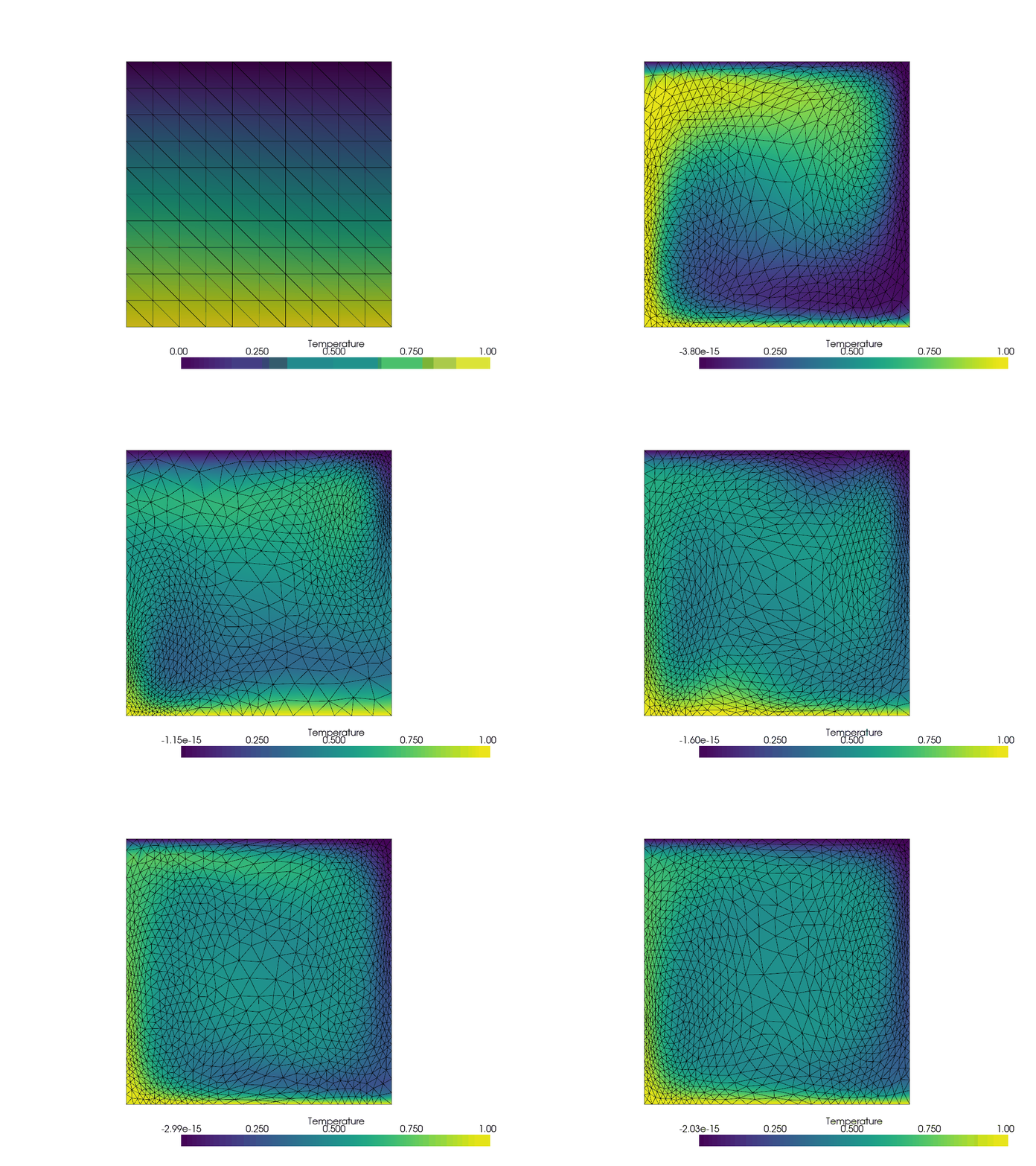
To learn more about the anisotropic, metric based adaptivity and various choices that can be made to assemble the metric, see the documentation of animate which also provides a number of tutorials.